Welcome to the world of big data and cloud scalability—where Azure Data Lake Storage stands as a powerhouse for modern data architectures. This article dives deep into its features, benefits, and real-world applications, all in a relaxed yet professional tone.


What Is Azure Data Lake Storage?
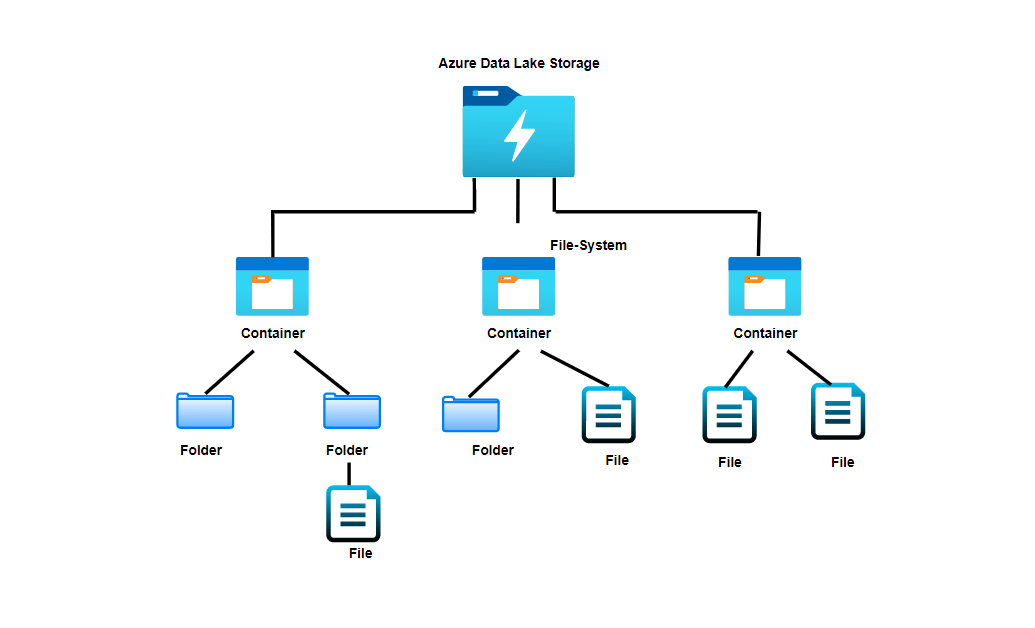
Azure Data Lake Storage (ADLS) is Microsoft’s scalable, secure, and high-performance data storage solution designed for big data analytics. Built on the foundation of Azure Blob Storage, it combines the advantages of a data lake with enterprise-grade capabilities, enabling organizations to store and analyze vast amounts of structured, semi-structured, and unstructured data.
Core Definition and Purpose
At its essence, Azure Data Lake Storage is a purpose-built repository for big data workloads. Unlike traditional databases or file systems, it supports massive scale and schema-on-read flexibility, allowing data to be ingested in its raw form without predefining structure.
- Designed for analytics at petabyte scale
- Supports diverse data types: JSON, CSV, Parquet, Avro, images, logs
- Enables data scientists, engineers, and analysts to explore data freely
Its primary goal is to eliminate data silos and support advanced analytics, machine learning, and real-time processing.
Evolution from ADLS Gen1 to Gen2
Azure Data Lake Storage has evolved significantly. Gen1, launched in 2016, was a dedicated data lake built on a hierarchical file system. While powerful, it came with higher costs and complexity. In response, Microsoft introduced ADLS Gen2 in 2018, merging the scalability of Azure Blob Storage with the hierarchical namespace of Gen1.
- Gen1: Dedicated service, HDFS-compatible, high I/O performance, but costly
- Gen2: Built on Blob Storage, lower cost, enhanced security, better integration with Azure services
Today, Gen2 is the recommended option for most use cases, offering superior cost-efficiency and broader ecosystem support. You can learn more about this transition on the official Microsoft documentation.
“Azure Data Lake Storage Gen2 combines the low cost and scalability of object storage with the hierarchical namespace required for high-performance analytics.” — Microsoft Azure Documentation
Key Features of Azure Data Lake Storage
Azure Data Lake Storage isn’t just another storage bucket—it’s a feature-rich platform engineered for the demands of modern data ecosystems. From hierarchical namespaces to intelligent tiering, ADLS delivers capabilities that empower data teams to innovate faster and more securely.
Hierarchical Namespace for Efficient Data Organization
One of the defining features of ADLS is its hierarchical namespace, which organizes data into directories and subdirectories—much like a traditional file system. This structure is crucial for big data frameworks like Apache Hadoop and Spark, which rely on efficient directory traversal.
- Enables faster metadata operations (e.g., rename, move)
- Improves query performance by reducing scan times
- Supports ACLs (Access Control Lists) at folder and file levels
Without this feature, blob storage would require scanning millions of objects to simulate folder structures, leading to latency and inefficiency.
Massive Scalability and High Throughput
ADLS is built to scale seamlessly. Whether you’re storing gigabytes or exabytes, the platform automatically handles distribution and replication across Azure’s global infrastructure.
- Supports up to 100s of PB per account
- Delivers high I/O throughput for parallel analytics workloads
- Integrates with Azure Data Factory, Synapse, and Databricks for high-speed data pipelines
This scalability is essential for industries like healthcare, finance, and IoT, where data volumes grow exponentially. For example, a global retailer might use ADLS to store years of transaction logs, customer behavior data, and inventory records—all in one place.
Security and Compliance Capabilities
Security is not an afterthought in Azure Data Lake Storage—it’s embedded at every layer. From encryption to role-based access control, ADLS ensures that sensitive data remains protected.
- Server-side encryption with Microsoft-managed or customer-managed keys (CMK)
- Integration with Azure Active Directory (AAD) for identity management
- Support for Azure Policy, Private Endpoints, and VNet integration
Additionally, ADLS complies with major regulatory standards such as GDPR, HIPAA, and ISO 27001, making it suitable for regulated industries. You can explore compliance details on the Azure Compliance Documentation.
How Azure Data Lake Storage Works
Understanding the architecture of Azure Data Lake Storage is key to leveraging its full potential. At its core, ADLS Gen2 operates as a layer on top of Azure Blob Storage, enhancing it with a hierarchical file system interface.
Architecture Overview
ADLS Gen2 uses a dual-protocol access model: it supports both the native Blob Storage REST API and the HDFS-compatible file system API (via ABFS driver). This duality allows seamless integration with both cloud-native and big data tools.
- Data is stored as blobs in containers
- The hierarchical namespace maps blobs to a directory structure
- Metadata operations are optimized for speed and consistency
This architecture enables high-performance analytics while maintaining cost efficiency. For instance, Azure Synapse can query data directly from ADLS without moving it, reducing latency and storage costs.
Data Ingestion and Storage Mechanisms
Data can be ingested into Azure Data Lake Storage through various methods, including batch uploads, streaming, and automated pipelines.
- Batch ingestion: Using Azure Data Factory, AzCopy, or SDKs to move large datasets
- Streaming ingestion: Leveraging Azure Event Hubs or IoT Hub to capture real-time data
- Automated workflows: Trigger-based data movement using Logic Apps or Functions
Once ingested, data is stored in its raw form (landing zone), then processed and organized into curated zones (e.g., bronze, silver, gold layers in a medallion architecture).
“The ABFS driver (Azure Blob File System) enables Hadoop applications to access data in ADLS Gen2 as if it were a distributed file system.” — Apache Hadoop Project
Integration with Azure Analytics Services
Azure Data Lake Storage shines brightest when integrated with Microsoft’s analytics ecosystem. It serves as the central data hub for services like Azure Synapse Analytics, Azure Databricks, and Power BI, enabling end-to-end data workflows.
Synergy with Azure Synapse Analytics
Azure Synapse is a limitless analytics service that combines data integration, enterprise data warehousing, and big data analytics. It natively connects to ADLS, allowing users to run SQL queries on raw data without loading it into a warehouse.
- Serverless SQL pools query data directly from ADLS
- Dedicated SQL pools can import data for high-performance reporting
- Spark pools enable large-scale data transformation and machine learning
This tight integration reduces data movement, lowers costs, and accelerates time-to-insight. For example, a financial institution can use Synapse to analyze fraud patterns across terabytes of transaction data stored in ADLS.
Powering Azure Databricks with ADLS
Azure Databricks, a fast-paced analytics platform optimized for Apache Spark, integrates seamlessly with ADLS. Data engineers use Databricks notebooks to process, clean, and enrich data stored in the lake.
- Mount ADLS containers as file systems in Databricks
- Use Delta Lake for ACID transactions and schema enforcement
- Run machine learning models on large datasets with MLflow integration
This combination is ideal for advanced analytics and AI workloads. A healthcare provider, for instance, might use Databricks on ADLS to analyze patient records and predict disease outbreaks.
Connecting to Power BI for Visualization
Power BI, Microsoft’s business intelligence tool, can connect directly to ADLS via Azure Data Lake Storage connectors. While direct querying is limited, Power BI often pulls data from curated datasets in ADLS via Synapse or Databricks.
- Import mode: Load processed data into Power BI datasets
- DirectQuery mode: Connect to Synapse SQL pools linked to ADLS
- Use Power Query to transform and model data before visualization
This enables dynamic dashboards and real-time reporting based on the most up-to-date data in the lake.
Performance Optimization Techniques
To get the most out of Azure Data Lake Storage, performance tuning is essential. From data partitioning to intelligent tiering, several strategies can enhance speed and reduce costs.
Data Partitioning and File Sizing Best Practices
How you structure your data in ADLS directly impacts query performance. Poorly sized files or unpartitioned data can lead to slow scans and high compute costs.
- Aim for file sizes between 100 MB and 1 GB for optimal I/O performance
- Partition data by date, region, or category to minimize scan scope
- Use columnar formats like Parquet or ORC for analytics workloads
For example, partitioning sales data by year/month/day allows queries to skip irrelevant partitions, dramatically improving speed.
Leveraging Storage Tiers for Cost Efficiency
ADLS supports multiple storage tiers: Hot, Cool, and Archive. Choosing the right tier based on data access frequency can significantly reduce costs.
- Hot tier: For frequently accessed data (e.g., daily reports)
- Cool tier: For infrequently accessed data (e.g., monthly backups)
- Archive tier: For long-term retention (e.g., compliance archives)
Automate tier transitions using Azure Lifecycle Management policies. For instance, move data older than 90 days from Hot to Cool, and after 365 days to Archive.
“Optimizing file size and partitioning can reduce query costs by up to 70% in large-scale analytics environments.” — Microsoft Azure Performance Guide
Security and Governance in Azure Data Lake Storage
In today’s data-driven world, security and governance are non-negotiable. Azure Data Lake Storage provides robust tools to ensure data integrity, access control, and auditability.
Role-Based Access Control (RBAC) and ACLs
ADLS supports two layers of access control: Azure RBAC for account-level permissions and POSIX-like ACLs for granular file/folder access.
- RBAC roles: Storage Blob Data Reader, Contributor, Owner
- ACLs: Set read, write, execute permissions for users, groups, or service principals
- Combine both for defense-in-depth security
For example, a data analyst might have read access to a specific folder via ACLs, while a data engineer has write access through RBAC.
Data Encryption and Threat Protection
All data in ADLS is encrypted at rest and in transit by default. You can enhance this with customer-managed keys (CMK) for greater control.
- Encryption at rest using AES-256
- Customer-managed keys stored in Azure Key Vault
- Integration with Microsoft Defender for Cloud for threat detection
Defender for Cloud monitors for suspicious activities, such as unusual access patterns or ransomware attacks, and alerts administrators in real time.
Audit Logging and Data Lineage
Tracking who accessed what data and when is critical for compliance and troubleshooting. ADLS integrates with Azure Monitor and Log Analytics to provide detailed audit logs.
- Enable diagnostic settings to capture read/write operations
- Use Azure Purview for data cataloging and lineage tracking
- Visualize data flow from ingestion to consumption
Azure Purview, in particular, helps organizations discover, classify, and govern data across ADLS, ensuring transparency and regulatory compliance.
Real-World Use Cases of Azure Data Lake Storage
The true power of Azure Data Lake Storage becomes evident when applied to real-world scenarios. Across industries, organizations are leveraging ADLS to drive innovation, improve decision-making, and scale their data operations.
Healthcare: Patient Data Analytics
Hospitals and research institutions use ADLS to store and analyze vast amounts of patient data, including electronic health records (EHR), imaging files, and genomic data.
- Centralize data from multiple sources into a single lake
- Apply machine learning models to predict patient outcomes
- Ensure HIPAA compliance with encryption and access controls
For example, a cancer research center might use ADLS to store tumor scans and treatment histories, then analyze them using Azure ML to identify effective therapies.
Retail: Customer Behavior Analysis
Retailers collect massive volumes of data from e-commerce platforms, point-of-sale systems, and mobile apps. ADLS serves as the foundation for analyzing customer behavior and personalizing experiences.
- Ingest clickstream, purchase history, and inventory data
- Use Databricks to build recommendation engines
- Visualize trends in Power BI for marketing teams
A global fashion brand could use ADLS to analyze seasonal buying patterns and optimize inventory distribution across regions.
IoT and Manufacturing: Predictive Maintenance
In manufacturing, sensors on machines generate continuous streams of telemetry data. ADLS stores this data for real-time monitoring and predictive maintenance.
- Stream sensor data via IoT Hub to ADLS
- Process data with Azure Stream Analytics or Databricks
- Train models to predict equipment failures before they occur
An automotive plant might use this setup to reduce downtime by 30% through early detection of engine anomalies.
Migrating to Azure Data Lake Storage
For organizations moving from on-premises systems or other cloud platforms, migrating to Azure Data Lake Storage requires careful planning and execution.
Assessment and Planning Phase
Before migration, assess your current data landscape: volume, types, access patterns, and security requirements.
- Inventory existing data sources and dependencies
- Define data zones (raw, curated, archive) in the new lake
- Estimate storage and bandwidth needs
Tools like Azure Migrate can help assess on-premises workloads and estimate migration effort.
Data Transfer Methods and Tools
Azure offers several options for moving data into ADLS, depending on size and network conditions.
- AzCopy: Command-line tool for high-speed transfers over the internet
- Azure Data Factory: Orchestrate complex, scheduled data pipelines
- Azure Import/Export: Ship physical disks to Azure data centers for large migrations
For a 100 TB migration, using the Import/Export service might be faster and cheaper than transferring over the internet.
“Migrating to ADLS is not just a technical shift—it’s a strategic move toward data democratization and advanced analytics.” — Gartner Research
What is Azure Data Lake Storage used for?
Azure Data Lake Storage is used for storing and analyzing large volumes of structured, semi-structured, and unstructured data. It supports big data analytics, machine learning, IoT, and enterprise data warehousing by providing a scalable, secure, and high-performance storage layer.
How does ADLS Gen2 differ from Gen1?
ADLS Gen2 is built on Azure Blob Storage with a hierarchical namespace, offering lower costs, better scalability, and tighter integration with Azure services. Gen1 was a separate service with higher performance but greater complexity and expense.
Is Azure Data Lake Storage secure?
Yes, ADLS provides robust security features including encryption at rest and in transit, Azure Active Directory integration, role-based access control, private endpoints, and compliance with standards like GDPR and HIPAA.
Can I use ADLS with non-Microsoft tools?
Yes, ADLS supports integration with third-party tools via REST APIs, HDFS connectors, and open formats like Parquet. Tools like Apache Spark, Tableau, and Informatica can access data in ADLS.
What are the cost implications of using ADLS?
Costs depend on storage tier (Hot, Cool, Archive), data redundancy, and data transfer. ADLS Gen2 is generally more cost-effective than Gen1, especially for large-scale storage. Lifecycle management can further reduce costs by automating tier transitions.
In conclusion, Azure Data Lake Storage is a transformative solution for organizations aiming to harness the power of big data. With its scalable architecture, robust security, seamless integration with analytics tools, and cost-effective storage tiers, ADLS empowers businesses to innovate and make data-driven decisions. Whether you’re in healthcare, retail, or manufacturing, adopting ADLS can be a strategic leap toward a modern data estate. By understanding its features, optimizing performance, and following best practices, you can unlock the full potential of your data ecosystem.
Recommended for you 👇
Further Reading: