Imagine building scalable, event-driven applications without worrying about servers. With Azure Functions, Microsoft’s serverless computing service, that’s not just possible—it’s simple, efficient, and cost-effective. Let’s dive into how this powerful tool is reshaping cloud development.



What Are Azure Functions?

Azure Functions is Microsoft’s serverless compute service that allows developers to run small pieces of code—”functions”—in response to various events, without the need to manage infrastructure. It’s part of the broader Azure ecosystem and enables rapid development by abstracting away server management, scaling, and maintenance.
Core Concept of Serverless Computing
Serverless doesn’t mean there are no servers—it means you don’t have to manage them. In a serverless model like Azure Functions, the cloud provider dynamically allocates resources and runs code only when triggered. You’re charged based on execution time and resource consumption, not idle capacity.
- No need to provision or maintain virtual machines
- Automatic scaling based on demand
- Pay-per-execution pricing model
“Serverless computing allows developers to focus on code, not infrastructure.” — Microsoft Azure Documentation
How Azure Functions Work
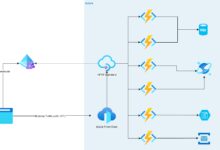
Azure Functions execute in response to triggers—events from Azure services (like Blob Storage, Event Hubs, or HTTP requests) or third-party systems. Once triggered, the function runs your code and can integrate with other services via bindings.
- Triggers initiate function execution (e.g., an HTTP request or a new file upload)
- Bindings simplify input/output operations (e.g., reading from a queue or writing to a database)
- Functions can be written in multiple languages including C#, JavaScript, Python, Java, and PowerShell
Azure Functions vs Traditional Hosting
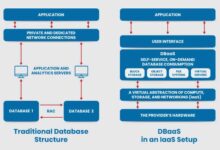
Understanding the difference between Azure Functions and traditional hosting models like VMs or web apps is crucial for making informed architectural decisions. The shift from monolithic to microservices and event-driven patterns has made serverless a compelling alternative.
Resource Management and Scalability
Traditional hosting often requires pre-allocating server resources, leading to over-provisioning or performance bottlenecks. Azure Functions, on the other hand, scale automatically—from zero to thousands of instances—based on incoming load.
- Auto-scaling reduces operational overhead
- No cold starts in Premium or Dedicated plans
- Ideal for spiky or unpredictable workloads
Cost Efficiency Comparison
With traditional hosting, you pay for server uptime regardless of usage. Azure Functions use a consumption-based pricing model, meaning you only pay when your code runs. For low-traffic or intermittent workloads, this can result in significant cost savings.
- Consumption Plan: Pay per execution and memory used
- Premium Plan: Higher performance with pre-warmed instances
- Dedicated (App Service) Plan: Fixed cost, full control
Learn more about pricing models at Azure Functions Pricing.
Key Features of Azure Functions
Azure Functions offer a rich set of features that empower developers to build robust, scalable, and maintainable applications. These features are designed to integrate seamlessly with the broader Azure ecosystem and support modern development practices.
Event-Driven Architecture Support
At its core, Azure Functions is built for event-driven programming. Whether it’s a file upload to Blob Storage, a message arriving in a Service Bus queue, or an HTTP webhook from a third-party service, functions react instantly.
- Supports over 200 Azure and third-party triggers
- Enables real-time data processing pipelines
- Reduces latency in system responses
Language and Runtime Flexibility
One of the standout advantages of Azure Functions is its support for multiple programming languages. Developers can choose the language they’re most comfortable with, ensuring faster development cycles and easier team adoption.
- C# (.NET) for enterprise-grade applications
- JavaScript/Node.js for lightweight APIs
- Python for data processing and AI workflows
- Java and PowerShell for integration and automation tasks
Explore supported languages at Azure Functions Supported Languages.
Integration with Azure Services
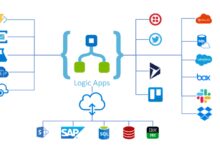
Azure Functions natively integrate with services like Azure Storage, Cosmos DB, Event Grid, Logic Apps, and API Management. This tight integration simplifies complex workflows and reduces the need for custom glue code.
- Use bindings to connect to databases, queues, and event streams
- Trigger functions from Event Grid events for real-time reactions
- Combine with Logic Apps for low-code workflow automation
Use Cases for Azure Functions
The versatility of Azure Functions makes them suitable for a wide range of scenarios—from simple automation scripts to complex data processing systems. Let’s explore some of the most impactful use cases.
Real-Time File Processing
When a user uploads an image or document to Azure Blob Storage, a function can automatically trigger to resize the image, extract metadata, or convert file formats. This enables instant processing without blocking the main application flow.
- Image thumbnail generation
- PDF to text extraction using AI services
- Video transcoding workflows
Automated Workflows and Integrations
Azure Functions can act as the glue between disparate systems. For example, when a new customer signs up in Salesforce, a function can sync the data to an internal CRM or send a welcome email via SendGrid.
- Synchronize data across platforms
- Send notifications via email, SMS, or push
- Trigger approval workflows in Microsoft Teams
Data Aggregation and ETL Processes
Functions are ideal for lightweight Extract, Transform, Load (ETL) operations. They can pull data from multiple sources, transform it, and load it into a data warehouse or analytics platform like Power BI.
- Poll external APIs on a schedule (using Timer Triggers)
- Transform JSON/XML data into structured formats
- Load cleaned data into Azure SQL or Synapse Analytics
See an example ETL pipeline using Azure Functions at Blob Storage Bindings.
Deployment and Development Models
Developing and deploying Azure Functions can be done in multiple ways, depending on your team’s workflow, CI/CD pipeline, and operational requirements. Microsoft provides flexible tooling to support various development styles.
Local Development with Azure Functions Core Tools
The Azure Functions Core Tools allow developers to build, test, and debug functions locally before deploying to the cloud. This ensures code quality and reduces deployment risks.
- Run functions on your local machine using CLI
- Debug with Visual Studio or VS Code
- Simulate triggers and bindings locally
CI/CD Integration with GitHub Actions and Azure DevOps
For teams practicing DevOps, Azure Functions support seamless integration with GitHub Actions and Azure Pipelines. This enables automated testing, staging, and production deployments.
- Automate builds on every code commit
- Deploy to multiple environments (dev, test, prod)
- Roll back changes easily with deployment slots
Set up CI/CD with GitHub Actions: GitHub Actions for Azure Functions.
Visual Studio and VS Code Tooling
Microsoft provides rich extensions for both Visual Studio and Visual Studio Code, offering IntelliSense, debugging, and one-click publishing. These tools enhance productivity and streamline the development lifecycle.
- Create new functions with templates
- Manage function apps directly from the IDE
- Monitor logs and performance in real time
Monitoring, Logging, and Performance
Even the best-written functions need monitoring to ensure reliability and performance. Azure provides robust tools to track execution, diagnose issues, and optimize resource usage.
Application Insights Integration
Every Azure Function app can be linked to Application Insights, Microsoft’s application performance monitoring (APM) service. This provides deep insights into function execution times, error rates, and dependencies.
- Track custom metrics and logs
- Set up alerts for failures or slow responses
- Analyze user behavior and system performance
Log Streaming and Diagnostics
During development and production, real-time log streaming helps identify issues quickly. The Azure portal offers a log stream viewer, and logs can also be exported to Log Analytics or external SIEM tools.
- View live logs during function execution
- Filter logs by function, level, or time range
- Export logs for compliance and auditing
Performance Optimization Tips
To get the most out of Azure Functions, consider these best practices for performance:
- Minimize cold start times by using the Premium plan for critical functions
- Reuse HTTP clients and database connections across invocations
- Keep function execution time under 10 minutes (or use Durable Functions for long-running tasks)
- Use async/await patterns to avoid blocking threads
Learn more about performance best practices at Azure Functions Best Practices.
Advanced Scenarios: Durable Functions and Orchestration
While standard Azure Functions are stateless and short-lived, some workflows require stateful coordination, long-running processes, or complex sequences. This is where Durable Functions come in—a powerful extension of Azure Functions.
What Are Durable Functions?
Durable Functions allow you to write stateful functions in a serverless environment. They enable patterns like function chaining, fan-out/fan-in, async HTTP APIs, and human interaction workflows.
- Orchestrator functions manage workflow logic
- Activity functions perform individual tasks
- Entity functions maintain state across calls
Common Orchestration Patterns
Durable Functions support several design patterns that are difficult to implement with standard functions:
- Function Chaining: Execute multiple functions in sequence, passing output from one to the next
- Fan-out/Fan-in: Run multiple functions in parallel and wait for all to complete before proceeding
- Async HTTP APIs: Expose long-running processes via HTTP with status polling endpoints
Explore Durable Functions patterns at Durable Functions Documentation.
Use Case: Order Processing Workflow
Imagine an e-commerce system where placing an order triggers a series of steps: validate inventory, charge payment, notify warehouse, and send confirmation email. A Durable Function can orchestrate this entire flow, handling retries, timeouts, and errors gracefully.
- State is automatically persisted in Azure Storage
- Workflow can survive app restarts
- Supports human approval steps (e.g., manager sign-off)
Security and Best Practices
Security is paramount when deploying code to the cloud. Azure Functions provide several built-in mechanisms to secure your applications, but developers must also follow best practices to avoid vulnerabilities.
Authentication and Authorization
Azure Functions can integrate with Azure Active Directory (AAD), Easy Auth, and third-party identity providers to secure HTTP endpoints. This ensures only authorized users or services can invoke your functions.
- Use AAD for enterprise-grade authentication
- Enable Easy Auth for simple identity management
- Restrict function access with API keys or client certificates
Secrets Management with Azure Key Vault
Hardcoding secrets like database passwords or API keys in function code is a major security risk. Azure Key Vault allows secure storage and retrieval of secrets, which can be accessed by functions at runtime.
- Store connection strings, passwords, and certificates in Key Vault
- Grant functions managed identity access to Key Vault
- Rotate secrets automatically without code changes
Learn how to integrate Key Vault: Secrets Management in Azure Functions.
Secure Coding and Input Validation
Even with infrastructure security, poor coding practices can expose vulnerabilities. Always validate input, sanitize data, and follow the principle of least privilege.
- Validate all HTTP inputs to prevent injection attacks
- Use parameterized queries for database access
- Limit function permissions using Role-Based Access Control (RBAC)
What are Azure Functions?
Azure Functions is a serverless compute service by Microsoft that runs code in response to events without requiring server management. It supports multiple languages and integrates with Azure services for scalable, event-driven applications.
How much do Azure Functions cost?
Azure Functions offer a Consumption Plan where you pay per execution and resource usage, starting with a free tier. There are also Premium and Dedicated plans for higher performance and predictable workloads. Detailed pricing is available on the official pricing page.
Can Azure Functions call each other?
Yes, Azure Functions can call each other via HTTP triggers or message queues. For complex workflows, Durable Functions provide a better way to orchestrate multiple functions with state management and error handling.
What languages are supported in Azure Functions?
Azure Functions support C#, JavaScript (Node.js), Python, Java, PowerShell, and TypeScript. The choice depends on your team’s expertise and the use case. More details at supported languages.
How do I monitor Azure Functions?
You can monitor Azure Functions using Application Insights for performance tracking, log streaming in the Azure portal, and integration with Azure Monitor. These tools help track execution, errors, and resource usage in real time.
Azure Functions represent a transformative shift in how we build and deploy applications in the cloud. By eliminating server management, enabling event-driven architectures, and offering seamless integration with Azure services, they empower developers to focus on what matters most: writing great code. Whether you’re processing files, automating workflows, or orchestrating complex business processes with Durable Functions, the platform provides the tools, scalability, and security needed for modern applications. As serverless computing continues to evolve, Azure Functions remain at the forefront, offering a powerful, flexible, and cost-effective solution for developers worldwide.
Recommended for you 👇
Further Reading: