Welcome to the future of data management—where speed, scalability, and simplicity converge. Database as a Service (DBaaS) is revolutionizing how businesses store, access, and manage their data without the overhead of traditional database administration.



What Is Database as a Service (DBaaS)?

Database as a Service (DBaaS) is a cloud-based model that delivers database functionality as a fully managed service. Instead of installing and maintaining databases on-premise, organizations can leverage DBaaS to access databases over the internet with minimal setup and ongoing management.
Core Definition and Concept
At its heart, DBaaS abstracts the complexity of database administration. It allows developers and businesses to focus on application logic and data usage rather than server provisioning, patching, backups, or replication setup. The service provider handles all infrastructure tasks, offering a seamless, on-demand database experience.
- Eliminates the need for physical hardware
- Provides instant access to database instances
- Supports multiple database types (SQL, NoSQL, etc.)
How DBaaS Differs from Traditional Databases
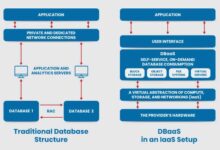
Traditional databases require in-house IT teams to manage servers, storage, networking, and software updates. In contrast, DBaaS shifts this responsibility to the cloud provider. This model reduces capital expenditure (CapEx) and converts it into operational expenditure (OpEx), making it ideal for startups and enterprises alike.
“DBaaS transforms database management from a cost center into a strategic enabler.” — Gartner Research
Key Components of a DBaaS Architecture
A typical DBaaS platform consists of several layers: the user interface (portal or API), orchestration engine, storage layer, compute resources, and security framework. These components work together to deliver a resilient, scalable, and secure database environment.
- User Interface: Web console or CLI for managing instances
- Orchestration Layer: Automates provisioning, scaling, and failover
- Storage & Compute: Decoupled for independent scaling
How Does Database as a Service (DBaaS) Work?
Understanding the inner workings of DBaaS helps demystify its value. It operates on a self-service model where users request database instances via a dashboard or API, and the system automatically provisions the necessary resources.
Provisioning and Deployment Process
When a user requests a new database instance, the DBaaS platform allocates virtual machines or containers, installs the database engine (e.g., MySQL, PostgreSQL, MongoDB), configures networking, and applies security policies—all within minutes. This process is often automated using Infrastructure as Code (IaC) principles.
- Self-service portal for instant deployment
- Automated configuration based on templates
- Integration with CI/CD pipelines for DevOps
Underlying Infrastructure and Virtualization
DBaaS runs on virtualized or containerized environments hosted in public, private, or hybrid clouds. Providers like AWS, Google Cloud, and Microsoft Azure use advanced virtualization technologies to isolate tenant databases while maximizing resource utilization.
For example, Amazon RDS uses EC2 instances under the hood but abstracts them away from the user, presenting a clean database service interface.
Automation and Management Tools
One of the biggest advantages of DBaaS is automation. Routine tasks such as backups, patching, monitoring, and scaling are handled automatically. Tools like automated failover, performance tuning, and query optimization are built into the service.
- Scheduled backups with point-in-time recovery
- Automatic software patching and version upgrades
- Real-time monitoring and alerting
Top 7 Benefits of Database as a Service (DBaaS)
The rise of DBaaS isn’t just a trend—it’s a strategic shift driven by tangible business outcomes. Here are seven powerful benefits that make DBaaS indispensable in today’s digital landscape.
1. Cost Efficiency and Reduced TCO
DBaaS eliminates the need for upfront investment in hardware and reduces staffing costs for database administrators (DBAs). With a pay-as-you-go pricing model, organizations only pay for the resources they consume.
According to a study by IBM, companies using DBaaS report up to 40% reduction in total cost of ownership (TCO) over three years compared to on-premise solutions.
- No capital expenditure on servers
- Lower labor costs due to automation
- Flexible pricing models (hourly, monthly, reserved)
2. Scalability and Elasticity
One of the most compelling features of DBaaS is its ability to scale instantly. Whether you need more storage, higher throughput, or additional read replicas, DBaaS platforms allow vertical and horizontal scaling with minimal downtime.
For instance, Google Cloud SQL enables automatic storage increases when disk usage approaches capacity, ensuring uninterrupted operations.
- Vertical scaling: Increase CPU, RAM, or storage
- Horizontal scaling: Add read replicas or sharding
- Auto-scaling based on traffic patterns
3. High Availability and Disaster Recovery
DBaaS providers offer built-in redundancy across multiple availability zones (AZs) or regions. This ensures high availability even during hardware failures or regional outages.
Most platforms support automated failover, backup replication, and point-in-time recovery, drastically reducing recovery time objectives (RTO) and recovery point objectives (RPO).
- Multi-AZ deployments for fault tolerance
- Automated backups stored in durable storage (e.g., S3, Cloud Storage)
- Disaster recovery drills and geo-replication
4. Faster Time-to-Market
With DBaaS, development teams can spin up database instances in minutes instead of weeks. This accelerates application development cycles, enabling faster prototyping, testing, and deployment.
Startups and agile teams benefit immensely, as they can iterate quickly without waiting for IT procurement or setup.
- Instant access to pre-configured database engines
- Integration with DevOps tools like Terraform and Kubernetes
- Support for microservices architecture
5. Enhanced Security and Compliance
Security is a top priority for DBaaS providers. They offer encryption at rest and in transit, network isolation via VPCs, role-based access control (RBAC), and compliance with standards like GDPR, HIPAA, and SOC 2.
For example, Azure Database includes advanced threat protection and vulnerability assessment out of the box.
- Data encryption using AES-256 or TLS 1.3
- Regular security audits and penetration testing
- Compliance certifications for global regulations
6. Automated Maintenance and Updates
Manual patching and updates are time-consuming and risky. DBaaS automates these processes, applying security patches and version upgrades during maintenance windows with minimal disruption.
This ensures databases remain secure and performant without requiring constant human intervention.
- Scheduled maintenance windows
- Zero-downtime updates for supported engines
- Rollback options in case of issues
7. Global Accessibility and Remote Collaboration
DBaaS enables teams to access databases from anywhere in the world, provided they have internet connectivity and proper authentication. This is especially valuable for distributed teams and remote-first organizations.
With secure APIs and web interfaces, developers, analysts, and DBAs can collaborate seamlessly across geographies.
- Access via HTTPS and secure API endpoints
- Integration with identity providers (e.g., Okta, Azure AD)
- Support for hybrid and multi-cloud environments
Types of Database as a Service (DBaaS) Models
Not all DBaaS offerings are the same. Different models cater to varying needs, from full automation to greater control. Understanding these models helps organizations choose the right fit.
Managed vs. Self-Managed DBaaS
In a fully managed DBaaS model, the provider handles everything—from setup to scaling to backups. Examples include Amazon RDS, Azure SQL Database, and Google Cloud SQL.
In contrast, self-managed DBaaS gives users more control over configurations but requires them to handle some administrative tasks. This model is often used in private cloud or on-premise deployments.
- Fully managed: Ideal for teams without dedicated DBAs
- Self-managed: Suitable for organizations needing fine-grained control
- Hybrid: Combines cloud delivery with on-premise control
Public, Private, and Hybrid DBaaS
Public DBaaS runs on third-party cloud infrastructure (e.g., AWS, GCP). It offers maximum scalability and cost efficiency.
Private DBaaS is deployed within an organization’s own data center or private cloud, offering enhanced security and compliance control.
Hybrid DBaaS combines both, allowing data to be shared between public and private environments—ideal for regulated industries.
- Public: Best for scalability and innovation
- Private: Preferred for sensitive data and compliance
- Hybrid: Balances flexibility and control
Single-Tenant vs. Multi-Tenant Architectures
In a multi-tenant DBaaS model, multiple customers share the same physical infrastructure but are logically isolated. This model is cost-effective and efficient for providers.
Single-tenant DBaaS dedicates infrastructure to one customer, offering better performance isolation and security—though at a higher cost.
- Multi-tenant: Economies of scale, lower cost
- Single-tenant: Higher performance, stronger isolation
- Choice depends on workload sensitivity and SLA requirements
Popular Database as a Service (DBaaS) Providers
The market for DBaaS is dominated by major cloud providers and specialized vendors. Each offers unique features, pricing models, and supported database engines.
Amazon Web Services (AWS) – Amazon RDS and Aurora
AWS offers two primary DBaaS solutions: Amazon RDS and Amazon Aurora. RDS supports popular engines like MySQL, PostgreSQL, Oracle, and SQL Server, while Aurora is a high-performance, MySQL- and PostgreSQL-compatible database engine built for the cloud.
Aurora delivers up to five times the throughput of standard MySQL and three times that of PostgreSQL, with built-in replication across multiple AZs.
- Automated backups and snapshots
- Read replicas for scaling reads
- Global databases for cross-region replication
Google Cloud Platform – Cloud SQL and AlloyDB
Google Cloud SQL provides managed MySQL, PostgreSQL, and SQL Server instances. It integrates tightly with other GCP services like BigQuery and Cloud Storage.
AlloyDB, Google’s newer offering, is a PostgreSQL-native service optimized for AI and analytics workloads, offering up to 4x better performance than standard PostgreSQL.
- Point-in-time recovery and high availability
- Integration with Vertex AI for machine learning
- Serverless options for bursty workloads
Microsoft Azure – Azure SQL Database and Cosmos DB
Azure SQL Database is a fully managed relational database service with intelligent performance tuning and built-in security. It supports both single databases and elastic pools for cost optimization.
Azure Cosmos DB is a globally distributed, multi-model NoSQL DBaaS designed for low-latency, high-throughput applications.
- Automatic tuning and threat detection
- Global distribution with SLA-backed latency
- Support for MongoDB, Cassandra, Gremlin, and Table APIs
Challenges and Limitations of Database as a Service (DBaaS)
While DBaaS offers numerous advantages, it’s not without challenges. Organizations must be aware of potential limitations before adoption.
Vendor Lock-In and Portability Issues
Many DBaaS platforms use proprietary extensions or management tools that make it difficult to migrate to another provider. For example, moving from Amazon Aurora to Google Cloud Spanner may require significant schema and query modifications.
To mitigate this, organizations should adopt open standards, use containerization, and design applications with portability in mind.
- Proprietary APIs and tools increase migration complexity
- Use of open-source databases improves portability
- Adopt infrastructure-as-code for easier replication
Performance and Latency Concerns
Although DBaaS platforms are highly optimized, performance can vary based on network latency, shared tenancy, and resource contention. Applications requiring ultra-low latency may experience bottlenecks if the database is hosted far from end-users.
Solutions include deploying DBaaS instances in regions close to users and using caching layers like Redis or Memcached.
- Latency increases with geographical distance
- Shared infrastructure may lead to noisy neighbors
- Caching and CDN integration can offset delays
Security and Compliance Risks
While DBaaS providers offer strong security, the shared responsibility model means customers must still configure access controls, encryption keys, and monitoring properly. Misconfigurations are a leading cause of data breaches in the cloud.
Organizations in regulated industries must ensure their DBaaS provider meets compliance requirements like HIPAA, PCI-DSS, or GDPR.
- Customer responsible for data classification and access policies
- Need for regular audits and configuration reviews
- Encryption key management (customer-managed vs. provider-managed)
Best Practices for Implementing Database as a Service (DBaaS)
To maximize the benefits of DBaaS while minimizing risks, organizations should follow proven best practices during implementation and operation.
Choosing the Right DBaaS Provider
Selection should be based on technical requirements, budget, compliance needs, and existing cloud ecosystem. Evaluate providers on uptime SLAs, support responsiveness, pricing transparency, and feature set.
- Assess compatibility with current tech stack
- Compare pricing models (on-demand vs. reserved)
- Check for multi-region and hybrid capabilities
Data Migration Strategies
Migrating to DBaaS requires careful planning. Use tools like AWS DMS, Google Database Migration Service, or Azure Data Migration Service to minimize downtime and data loss.
Strategies include:
- Lift-and-shift: Direct migration with minimal changes
- Replatforming: Optimize schema and queries for the cloud
- Hybrid approach: Run on-premise and cloud databases in parallel during transition
Monitoring, Backup, and Recovery Planning
Even with automated backups, organizations must define recovery objectives and test them regularly. Implement monitoring tools to track performance, usage, and security events.
- Set up alerts for CPU, memory, and disk usage
- Test backup restoration procedures quarterly
- Use cloud-native monitoring (e.g., CloudWatch, Stackdriver)
Future Trends in Database as a Service (DBaaS)
The DBaaS landscape is evolving rapidly, driven by advancements in AI, serverless computing, and edge technologies. Staying ahead of these trends ensures long-term competitiveness.
AI-Powered Database Optimization
Modern DBaaS platforms are integrating artificial intelligence to automate performance tuning, query optimization, and anomaly detection. For example, Azure SQL Database uses AI to recommend index changes and detect unusual access patterns.
In the near future, AI will predict scaling needs and self-heal database issues before they impact users.
Rise of Serverless Databases
Serverless DBaaS models like AWS Aurora Serverless and Google Cloud Firestore automatically scale to zero when idle, reducing costs for intermittent workloads. They are ideal for event-driven applications and microservices.
- No need to provision capacity in advance
- Pay only for actual usage (per request or per second)
- Automatic scaling from zero to thousands of requests
Edge DBaaS for IoT and Real-Time Applications
As IoT devices generate massive amounts of data, there’s growing demand for DBaaS at the edge. Edge DBaaS brings database capabilities closer to data sources, reducing latency and bandwidth usage.
Providers are beginning to offer edge-optimized databases that sync with central cloud instances, enabling real-time analytics and decision-making.
What is Database as a Service (DBaaS)?
Database as a Service (DBaaS) is a cloud-based offering that provides database functionality without the need for on-premise hardware or manual administration. It allows users to deploy, manage, and scale databases on-demand through a web interface or API.
What are the main benefits of DBaaS?
The key benefits include cost savings, scalability, high availability, faster deployment, automated maintenance, enhanced security, and global accessibility. It enables organizations to focus on innovation rather than infrastructure management.
Is DBaaS secure?
Yes, most DBaaS providers offer robust security features including encryption, access controls, and compliance certifications. However, security is a shared responsibility—customers must configure settings correctly to protect their data.
Can I migrate my existing database to DBaaS?
Yes, most cloud providers offer migration tools and services to help transfer on-premise or hosted databases to DBaaS with minimal downtime. Proper planning and testing are essential for a smooth transition.
Which DBaaS provider is best?
The best provider depends on your specific needs. AWS RDS and Aurora are excellent for scalability, Google Cloud SQL and AlloyDB offer strong AI integration, and Azure SQL Database and Cosmos DB are ideal for Microsoft-centric environments.
Database as a Service (DBaaS) has transformed how organizations manage data, offering unprecedented flexibility, efficiency, and innovation. From startups to enterprises, businesses are leveraging DBaaS to reduce costs, accelerate development, and ensure data resilience. While challenges like vendor lock-in and security configuration exist, following best practices and choosing the right provider can mitigate risks. As AI, serverless, and edge computing shape the future, DBaaS will continue to evolve, becoming even more intelligent, adaptive, and accessible. Embracing DBaaS isn’t just about technology—it’s about staying competitive in a data-driven world.
Recommended for you 👇
Further Reading: