Ever wondered how top tech companies deploy, scale, and manage applications seamlessly in the cloud? The answer often lies in Kubernetes Service (AKS)—a powerful, managed container orchestration platform by Microsoft Azure that’s transforming how businesses handle modern application infrastructure.



What Is Kubernetes Service (AKS)?

Microsoft Azure Kubernetes Service (AKS) is a fully managed container orchestration platform that simplifies the deployment, management, and scaling of containerized applications using Kubernetes. It removes much of the complexity involved in running Kubernetes clusters by handling critical tasks like health monitoring, node provisioning, upgrades, and scaling automatically.
Core Components of AKS
Understanding the architecture of AKS is essential for leveraging its full potential. The platform is built on several key components that work together to deliver a robust container orchestration environment.
- Control Plane: Managed entirely by Azure, the control plane includes the Kubernetes API server, scheduler, and etcd storage. You don’t manage these components directly, which reduces operational overhead.
- Node Pools: These are groups of virtual machines (VMs) that run your containerized workloads. You can configure multiple node pools with different VM sizes, operating systems, or scaling rules.
- Kubelet and Container Runtime: Each node runs kubelet, the agent that communicates with the control plane, and a container runtime like containerd to run containers.
How AKS Differs from Self-Managed Kubernetes
Running Kubernetes on your own infrastructure (such as on-premises or via VMs) requires significant expertise and ongoing maintenance. AKS eliminates much of this burden.
- Automatic upgrades and patching of the control plane.
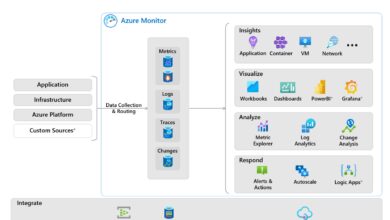
- Integrated monitoring and logging via Azure Monitor.
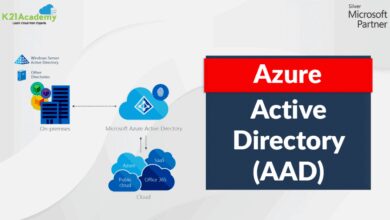
- Seamless integration with Azure Active Directory (AAD) for identity and access management.
“AKS allows developers to focus on building applications, not managing clusters.” — Microsoft Azure Documentation
Why Choose Kubernetes Service (AKS) for Your Cloud Strategy?
With so many managed Kubernetes offerings available—like Amazon EKS and Google GKE—why should organizations consider AKS? The answer lies in its deep integration with the Azure ecosystem, enterprise-grade security, and developer-friendly tooling.
Seamless Integration with Azure Services
One of AKS’s biggest advantages is its native integration with other Azure services. This tight coupling enables faster development cycles and more resilient architectures.
- Azure Container Registry (ACR): Easily store and manage container images with private registries that integrate directly with AKS deployments. Learn more at Microsoft’s ACR documentation.
- Azure Monitor and Log Analytics: Gain real-time insights into cluster performance, application logs, and resource utilization.
- Application Gateway and Azure Load Balancer: Efficiently manage traffic routing and load balancing for your microservices.
Enterprise-Grade Security and Compliance
Security is a top priority for enterprises, and AKS delivers robust features out of the box.
- Role-Based Access Control (RBAC) integrated with Azure AD.
- Network policies to restrict pod-to-pod communication.
- Support for confidential computing and encrypted nodes.
- Compliance with standards like GDPR, HIPAA, ISO 27001, and SOC 2.
These capabilities make AKS a trusted choice for regulated industries such as finance, healthcare, and government.
Setting Up Your First Kubernetes Service (AKS) Cluster
Getting started with AKS is straightforward, whether you prefer the Azure Portal, CLI, or Infrastructure as Code (IaC) tools like Terraform or Bicep.
Using Azure CLI to Deploy AKS
The Azure CLI is one of the fastest ways to create and manage AKS clusters. Here’s a step-by-step guide:
- Install the Azure CLI and log in using
az login. - Create a resource group:
az group create --name myResourceGroup --location eastus. - Deploy an AKS cluster:
az aks create --resource-group myResourceGroup --name myAKSCluster --node-count 2 --enable-addons monitoring --generate-ssh-keys. - Connect to the cluster using
az aks get-credentials --resource-group myResourceGroup --name myAKSCluster.
Once connected, you can deploy applications using kubectl, Kubernetes’ command-line tool.
Deploying Applications on AKS
After setting up your cluster, the next step is deploying containerized applications. This typically involves creating Kubernetes manifests (YAML files) that define deployments, services, and ingress rules.
- Create a deployment to run your application pods.
- Expose the deployment via a service (ClusterIP, NodePort, or LoadBalancer).
- Use Ingress controllers like NGINX or Application Gateway Ingress Controller (AGIC) for advanced routing.
For example, deploying a simple Nginx web server:
apiVersion: apps/v1
kind: Deployment
metadata:
  name: nginx-deployment
spec:
  replicas: 3
  selector:
    matchLabels:
      app: nginx
  template:
    metadata:
      labels:
        app: nginx
    spec:
      containers:
      - name: nginx
        image: nginx:latest
        ports:
        - containerPort: 80
Apply this using kubectl apply -f deployment.yaml.
Scaling and Managing Workloads in Kubernetes Service (AKS)
One of the primary reasons organizations adopt Kubernetes is for its powerful scaling capabilities. AKS enhances this with automated tools and intelligent scaling options.
Horizontal Pod Autoscaler (HPA)
The HPA automatically scales the number of pods in a deployment based on observed CPU utilization or custom metrics.
- Define resource requests and limits in your pod specifications.
- Create an HPA using
kubectl autoscale deployment nginx-deployment --cpu-percent=50 --min=2 --max=10. - Monitor scaling events with
kubectl get hpa.
This ensures your application can handle traffic spikes without manual intervention.
Cluster Autoscaler
The Cluster Autoscaler adjusts the number of nodes in your node pool based on pending pods and resource demands.
- Enables when node resources are insufficient to schedule new pods.
- Disables when nodes are underutilized, helping reduce costs.
- Configurable per node pool, allowing fine-grained control.
Enable it during cluster creation or update an existing cluster:
az aks nodepool update
  --resource-group myResourceGroup
  --cluster-name myAKSCluster
  --name mynodepool
  --enable-cluster-autoscaler
  --min-count 1
  --max-count 5
Networking in Kubernetes Service (AKS)
Networking is a critical aspect of any Kubernetes deployment. AKS supports multiple networking models to suit different use cases and performance requirements.
Kubenet vs. Azure CNI
AKS offers two primary networking options:
- Kubenet: Simpler to configure, assigns IP addresses from a private subnet. Nodes share a single subnet, and pods receive IPs from a separate address space. Best for smaller clusters.
- Azure CNI (Container Networking Interface): Assigns each pod a direct IP from the VNet subnet. Enables better integration with existing network policies and services but consumes more IP addresses.
Choosing between them depends on your scalability needs, IP address availability, and network policy requirements.
Ingress and Load Balancing Strategies
Managing external access to services in your AKS cluster requires careful planning.
- Azure Load Balancer: Automatically provisioned when you create a service of type LoadBalancer. Distributes traffic across your pods.
- Ingress Controllers: Provide HTTP/HTTPS routing to services. Popular options include NGINX Ingress Controller and Azure Application Gateway Ingress Controller (AGIC).
- External-DNS: Automatically updates DNS records when ingress resources are created or updated.
For production workloads, combining AGIC with WAF (Web Application Firewall) provides enhanced security and traffic management.
Security Best Practices for Kubernetes Service (AKS)
While AKS provides strong security features, misconfigurations can expose your applications. Following best practices is crucial.
Enable Azure AD Integration
Integrating AKS with Azure Active Directory (AAD) enhances authentication and authorization.
- Users and groups can be mapped to Kubernetes RBAC roles.
- Supports multi-factor authentication (MFA) and conditional access policies.
- Use
az aks create --enable-aadto enable during cluster creation.
This integration ensures only authorized users can access the cluster.
Use Pod Security Policies (PSP) or Azure Policy for Kubernetes
Pod Security Policies were deprecated in Kubernetes v1.25, but AKS supports Azure Policy for Kubernetes as a modern alternative.
- Enforce security standards like running containers as non-root users.
- Prevent privilege escalation and restrict host namespace access.
- Automatically audit and remediate non-compliant resources.
Enable Azure Policy add-on: az aks enable-addons --addons azure-policy --name myAKSCluster --resource-group myResourceGroup.
Monitoring and Observability in Kubernetes Service (AKS)
Effective monitoring is essential for maintaining application health and performance in dynamic environments.
Leveraging Azure Monitor for Containers
Azure Monitor for Containers provides deep insights into your AKS clusters.
- Collects metrics on CPU, memory, disk, and network usage.
- Aggregates logs from containers, nodes, and the control plane.
- Offers pre-built dashboards and alerting capabilities.
To enable it during cluster creation:
az aks create --resource-group myResourceGroup --name myAKSCluster
  --enable-addons monitoring
  --workspace-resource-id <log-analytics-workspace-id>
Using Prometheus and Grafana
For teams already using open-source monitoring tools, AKS supports Prometheus and Grafana integration.
- Deploy Prometheus using Helm charts or the Prometheus Operator.
- Use Grafana for visualization, with dashboards tailored to Kubernetes metrics.
- Integrate with Alertmanager for custom alerting rules.
These tools provide granular visibility into application behavior and infrastructure performance.
Cost Optimization Strategies for Kubernetes Service (AKS)
While AKS reduces operational costs, inefficient configurations can lead to high cloud bills. Optimizing resource usage is key.
Right-Sizing Node VMs and Pods
Choosing the right VM size and configuring proper resource limits prevents over-provisioning.
- Analyze historical usage patterns using Azure Monitor.
- Use smaller VMs with autoscaling instead of large, static nodes.
- Set CPU and memory requests/limits in pod specs to avoid resource starvation.
Leveraging Spot Instances and Virtual Nodes
AKS supports cost-saving features like Spot VMs and Virtual Nodes (powered by Azure Container Instances).
- Spot VMs: Up to 90% cheaper than regular VMs, ideal for fault-tolerant workloads.
- Virtual Nodes: Allow pods to run directly in ACI without managing VMs. Great for bursty workloads.
Example: Create a node pool with Spot VMs:
az aks nodepool add
  --resource-group myResourceGroup
  --cluster-name myAKSCluster
  --name spotpool
  --priority Spot
  --eviction-policy Delete
  --spot-max-price -1
  --node-count 2
Advanced Features and Use Cases of Kubernetes Service (AKS)
AKS isn’t just for basic container orchestration—it supports advanced scenarios that empower modern cloud-native development.
GitOps with Flux and Azure Arc
GitOps is a methodology that uses Git as the single source of truth for infrastructure and application deployments.
- Flux CD can be deployed on AKS to sync cluster state with Git repositories.
- Azure Arc extends AKS-like management to on-premises and multi-cloud clusters.
- Enables consistent CI/CD pipelines across environments.
Microsoft provides native support for Flux in AKS: Flux with Azure Arc documentation.
Machine Learning and AI Workloads on AKS
AKS is increasingly used to run machine learning training and inference pipelines.
- Integrate with Azure Machine Learning to deploy models as scalable services.
- Use GPU-enabled node pools for deep learning workloads.
- Leverage Kubeflow for end-to-end ML workflows.
This makes AKS a powerful platform for data science teams.
What is Kubernetes Service (AKS)?
Kubernetes Service (AKS) is a managed container orchestration service provided by Microsoft Azure that simplifies deploying, managing, and scaling containerized applications using Kubernetes.
How does AKS reduce operational overhead?
AKS reduces operational overhead by managing the control plane, automating upgrades, integrating with Azure monitoring tools, and supporting automated scaling and self-healing of workloads.
Is AKS free to use?
AKS itself is free—Microsoft does not charge for the control plane. However, you pay for the underlying infrastructure like VMs, storage, and networking used by your node pools.
Can I use AKS with hybrid or on-premises environments?
Yes, through Azure Arc, you can connect and manage on-premises Kubernetes clusters using the same tooling and policies as AKS, enabling a consistent hybrid cloud experience.
What are the best practices for securing an AKS cluster?
Best practices include enabling Azure AD integration, using Azure Policy for Kubernetes, applying network policies, scanning container images for vulnerabilities, and regularly updating node images.
Microsoft Azure’s Kubernetes Service (AKS) is more than just a managed Kubernetes offering—it’s a comprehensive platform that empowers organizations to build, deploy, and scale modern applications with confidence. From seamless Azure integration and robust security to advanced scaling and cost optimization, AKS delivers the tools needed to thrive in a cloud-native world. Whether you’re a startup or an enterprise, adopting AKS can streamline your DevOps workflows, improve application resilience, and accelerate time-to-market. As containerization continues to dominate the software landscape, mastering AKS is no longer optional—it’s essential.
Further Reading: