Cloud computing has revolutionized the way businesses operate, and at the forefront of this transformation stands Microsoft Azure—a robust, scalable, and secure cloud platform trusted by enterprises worldwide. Whether you’re migrating legacy systems or building AI-driven applications, Microsoft Azure delivers unmatched flexibility and innovation.




What Is Microsoft Azure and Why It Matters

Microsoft Azure is more than just a cloud service—it’s a comprehensive ecosystem of computing, storage, networking, analytics, and artificial intelligence tools designed to empower organizations of all sizes. Launched in 2010, Azure has rapidly evolved into one of the world’s leading cloud platforms, second only to Amazon Web Services (AWS) in market share, but leading in hybrid cloud solutions.
The Evolution of Microsoft Azure
Originally known as Windows Azure, the platform was rebranded to Microsoft Azure in 2014 to reflect its broader capabilities beyond Windows-based services. Over the years, Azure has expanded its offerings to support Linux, open-source technologies, and multi-cloud environments, making it a truly platform-agnostic solution.
- 2010: Launched as Windows Azure with basic compute and storage services.
- 2014: Rebranded to Microsoft Azure; introduced support for Linux VMs.
- 2015: Azure Resource Manager (ARM) launched, enabling infrastructure-as-code.
- 2018: Azure IoT Hub and Azure Sphere strengthened IoT security.
- 2020: Azure became the backbone for Microsoft 365 and Teams during the global remote work surge.
- 2023: Expanded AI services with Azure OpenAI integration, bringing GPT models to enterprise users.
Core Components of Microsoft Azure
Microsoft Azure offers over 200 services across various domains. The platform is built on a global network of data centers in more than 60 regions, ensuring low latency and compliance with local regulations.
- Compute: Virtual Machines, Azure Functions, App Services, and Kubernetes (AKS).
- Storage: Blob Storage, Disk Storage, Data Lake, and Archive Storage.
- Networking: Virtual Network, Load Balancer, Azure DNS, and ExpressRoute.
- Security & Identity: Azure Active Directory, Key Vault, Sentinel (SIEM), and Defender for Cloud.
- AI & Machine Learning: Azure Cognitive Services, Machine Learning Studio, and OpenAI Service.
“Microsoft Azure is not just about hosting applications—it’s about transforming how businesses innovate.” — Satya Nadella, CEO of Microsoft
Microsoft Azure vs. AWS vs. Google Cloud: A Strategic Comparison
When choosing a cloud provider, businesses often compare Microsoft Azure with Amazon Web Services (AWS) and Google Cloud Platform (GCP). While all three offer robust infrastructure, Azure stands out in integration, hybrid capabilities, and enterprise alignment.
Market Share and Global Reach
According to Synergy Research Group (2023), AWS holds about 32% of the global cloud infrastructure market, followed by Microsoft Azure at 23%, and Google Cloud at 11%. However, Azure leads in hybrid cloud adoption, especially among Fortune 500 companies.
- Azure operates in 60+ regions, more than any other cloud provider.
- It supports 140+ compliance certifications, including GDPR, HIPAA, and FedRAMP.
- Its partnership with local governments enables sovereign cloud offerings like Azure Germany and Azure China.
For more details on global data center presence, visit Microsoft Azure Global Infrastructure.
Integration with Microsoft Ecosystem
One of Azure’s biggest advantages is its seamless integration with Microsoft products like Windows Server, Active Directory, Office 365, and Dynamics 365. This makes migration easier for organizations already invested in Microsoft technologies.
- Single sign-on (SSO) across Azure AD and Microsoft 365.
- Hybrid identity management with on-premises Active Directory synchronization.
- Unified billing and administration through the Microsoft 365 admin center.
This tight integration reduces training overhead and accelerates cloud adoption.
Cost and Pricing Models
Azure offers flexible pricing models, including pay-as-you-go, reserved instances, and spot pricing for VMs. Its Azure Pricing Calculator allows businesses to estimate costs accurately before deployment.
- Reserved Instances can save up to 72% compared to pay-as-you-go.
- Hybrid Benefit allows customers to use existing Windows Server licenses on Azure, reducing costs.
- Spot VMs offer unused capacity at up to 90% discount for non-critical workloads.
Compared to AWS, Azure often provides better value for Windows-based workloads and hybrid scenarios.
Microsoft Azure Compute Services: Powering Modern Applications
At the heart of any cloud platform are its compute capabilities. Microsoft Azure offers a wide range of compute services tailored to different application needs—from traditional virtual machines to serverless functions.
Virtual Machines (VMs) in Microsoft Azure
Azure Virtual Machines provide on-demand, scalable computing resources. You can deploy Windows or Linux VMs in seconds, with options for GPU, memory-optimized, and high-performance computing instances.
- Supports over 600 pre-configured images from the Azure Marketplace.
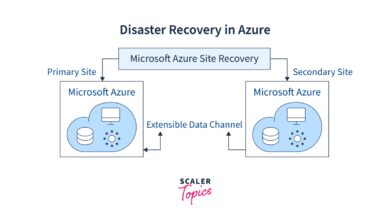
- Integration with Azure Backup and Site Recovery for disaster recovery.
- Autoscaling based on CPU, memory, or custom metrics.
VMs are ideal for lifting and shifting on-premises applications to the cloud with minimal changes.
Azure App Services: Simplified Web Hosting
Azure App Service is a fully managed platform for building, deploying, and scaling web apps. It supports multiple languages including .NET, Java, Node.js, Python, and PHP.
- Built-in CI/CD pipelines with GitHub, Azure DevOps, or Bitbucket.
- Automatic scaling and load balancing.
- Support for custom domains and SSL certificates.
Developers can focus on code while Azure handles infrastructure management, making it perfect for startups and agile teams.
Serverless Computing with Azure Functions
Azure Functions enables event-driven, serverless computing. You write small pieces of code (functions) that run in response to triggers like HTTP requests, database changes, or queue messages.
- Pay only for execution time—no charges when idle.
- Supports multiple programming languages and integrates with Logic Apps and Event Grid.
- Can scale automatically to handle thousands of events per second.
Use cases include image processing, data validation, chatbots, and real-time analytics.
Microsoft Azure Storage Solutions: Secure, Scalable, and Global
Data is the lifeblood of modern applications, and Microsoft Azure offers a variety of storage options designed for performance, durability, and cost-efficiency.
Blob Storage: For Unstructured Data
Azure Blob Storage is designed for storing massive amounts of unstructured data such as images, videos, logs, and backups. It offers three access tiers: Hot, Cool, and Archive.
- Hot tier: For frequently accessed data (lowest access cost, higher storage cost).
- Cool tier: For infrequently accessed data (lower storage cost, higher access cost).
- Archive tier: For long-term retention (lowest storage cost, highest retrieval cost and latency).
Blob Storage is highly durable (11 nines of durability) and integrates with Azure Data Lake for big data analytics.
File and Disk Storage
Azure Files provides fully managed file shares in the cloud accessible via SMB or NFS protocols. It’s ideal for lift-and-shift scenarios where applications expect a traditional file system.
- Lift-and-shift of legacy apps requiring shared file storage.
- Hybrid access via Azure File Sync, which caches files on-premises.
- Supports encryption at rest and in transit.
Azure Managed Disks simplify VM disk management by handling storage scalability and replication automatically.
Data Lake and Big Data Storage
Azure Data Lake Storage (ADLS) Gen2 combines the capabilities of Blob Storage with a hierarchical file system, making it ideal for big data analytics with tools like Azure Databricks, HDInsight, and Synapse Analytics.
- Supports massive-scale data ingestion and querying.
- Role-based access control (RBAC) and integration with Azure Active Directory.
- Optimized for Apache Spark and SQL workloads.
For more on data solutions, explore Azure Storage Services.
Networking in Microsoft Azure: Connecting the Cloud
Robust networking is critical for performance, security, and reliability. Microsoft Azure provides a comprehensive suite of networking services to connect cloud resources, on-premises systems, and users securely.
Virtual Networks and Subnets
Azure Virtual Network (VNet) enables isolation and segmentation of cloud resources. You can define subnets, IP ranges, and routing rules just like in an on-premises network.
- Supports IPv4 and IPv6.
- Network Security Groups (NSGs) control inbound and outbound traffic.
- User-defined routes allow custom traffic flow control.
VNets can be peered across regions or subscriptions for seamless communication.
ExpressRoute and VPN Gateway
For secure hybrid connectivity, Azure offers ExpressRoute and VPN Gateway.
- ExpressRoute: Private connection from on-premises to Azure via a connectivity provider. Offers higher bandwidth, lower latency, and SLA-backed uptime (99.95%).
- VPN Gateway: Encrypted IPsec tunnel over the public internet. Ideal for small to medium businesses or disaster recovery setups.
Both services integrate with on-premises firewalls and support multi-site configurations.
Azure Load Balancer and Traffic Manager
To ensure high availability, Azure provides Load Balancer (for internal/external traffic distribution) and Traffic Manager (for DNS-based global load balancing).
- Load Balancer supports Layer 4 (TCP/UDP) and is available in Basic and Standard tiers.
- Traffic Manager uses routing methods like Performance, Priority, Weighted, and Geographic to direct users to the nearest or best-performing endpoint.
- Both services integrate with autoscaling groups for dynamic resource allocation.
These tools are essential for building resilient, globally distributed applications.
Security and Compliance in Microsoft Azure
Security is a top priority for Microsoft Azure, which employs a shared responsibility model: Microsoft secures the infrastructure, while customers secure their data and applications.
Azure Active Directory (Azure AD)
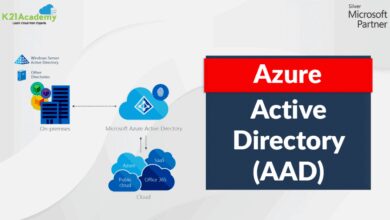
Azure AD is the identity and access management service at the core of Microsoft’s security framework. It enables single sign-on, multi-factor authentication (MFA), and conditional access policies.
- Supports over 2,500 pre-integrated SaaS applications.
- Conditional Access policies can enforce MFA based on user location, device compliance, or risk level.
- Integration with on-premises AD via Azure AD Connect.
Azure AD is now known as Microsoft Entra ID, part of the broader Microsoft Entra suite.
Microsoft Defender for Cloud
Defender for Cloud (formerly Azure Security Center) provides unified security management and advanced threat protection across hybrid cloud workloads.
- Continuous security assessment and recommendations.
- Threat detection using AI and behavioral analytics.
- Automated remediation workflows and security playbooks.
It supports servers, containers, databases, and even AWS and GCP resources, making it a multi-cloud security solution.
Compliance and Data Sovereignty
Microsoft Azure complies with more regulatory standards than any other cloud provider, including ISO 27001, SOC 1/2/3, GDPR, HIPAA, and CCPA.
- Data residency options allow organizations to store data in specific geographic regions.
- Sovereign clouds (e.g., Azure Government, Azure Germany) meet strict government requirements.
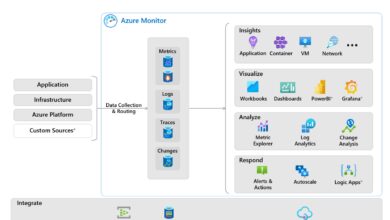
- Audit logs and activity tracking via Azure Monitor and Log Analytics.
For compliance details, visit Microsoft Compliance Manager.
Microsoft Azure AI and Machine Learning: The Future Is Here
Artificial intelligence is no longer a futuristic concept—Microsoft Azure makes it accessible to every developer and organization through powerful, easy-to-use AI services.
Azure Cognitive Services
Azure Cognitive Services are pre-built AI models that can be integrated into applications with minimal coding. They fall into five categories:
- Vision: Computer Vision, Face API, Custom Vision.
- Speech: Speech to Text, Text to Speech, Speaker Recognition.
- Language: Text Analytics, Translator, Language Understanding (LUIS).
- Decision: Anomaly Detector, Content Moderator, Personalizer.
- OpenAI Service: Access to GPT-3.5, GPT-4, and embedding models.
These APIs enable features like sentiment analysis, image recognition, and voice assistants.
Azure Machine Learning Studio
Azure Machine Learning is a cloud-based environment for training, deploying, and managing ML models. It supports both code-first (Python, R) and no-code (drag-and-drop) workflows.
- Automated ML (AutoML) helps build models without deep expertise.
- Integration with MLOps for model versioning, monitoring, and CI/CD.
- Supports ONNX, TensorFlow, PyTorch, and scikit-learn.
Data scientists can use compute clusters to train models at scale, while IT teams manage deployment and governance.
Real-World AI Use Cases on Microsoft Azure
Organizations across industries are leveraging Azure AI to solve real problems:
- Healthcare: AI-powered diagnostics using medical imaging analysis.
- Retail: Personalized recommendations using customer behavior data.
- Manufacturing: Predictive maintenance with IoT and ML.
- Finance: Fraud detection using anomaly detection models.
For example, Rolls-Royce uses Azure AI to analyze jet engine sensor data and predict maintenance needs, reducing downtime and costs.
Microsoft Azure DevOps and Developer Tools
Microsoft Azure isn’t just for IT infrastructure—it’s a complete platform for developers. With Azure DevOps, GitHub integration, and cloud-native tools, development teams can build and deploy faster.
Azure DevOps Services
Azure DevOps provides a suite of services for planning, developing, testing, and deploying applications.
- Azure Boards: Agile project management with backlogs, sprints, and dashboards.
- Azure Repos: Git repositories for source control.
- Azure Pipelines: CI/CD automation for any language and platform.
- Azure Test Plans: Manual and exploratory testing tools.
- Azure Artifacts: Package management for NuGet, npm, Maven, and Python.
It integrates seamlessly with IDEs like Visual Studio and VS Code.
GitHub and Azure Integration
Since Microsoft acquired GitHub in 2018, integration between GitHub and Azure has deepened. Developers can trigger Azure deployments directly from GitHub Actions.
- Deploy apps to Azure App Service, Functions, or Kubernetes from GitHub.
- Use GitHub Secrets and Environments for secure CI/CD.
- Monitor deployments with GitHub Status Checks and Azure Monitor.
This integration empowers open-source and enterprise teams alike.
Containerization and Kubernetes with AKS
Azure Kubernetes Service (AKS) simplifies the deployment, management, and scaling of containerized applications.
- Managed control plane reduces operational overhead.
- Integration with Azure Monitor, Log Analytics, and Azure Policy.
- Support for Windows and Linux containers.
- Auto-scaling and self-healing capabilities.
AKS is ideal for microservices architectures and cloud-native applications.
Migration to Microsoft Azure: Strategies and Best Practices
Migrating to the cloud can be daunting, but Microsoft provides tools and frameworks to streamline the process. Whether you’re moving a single application or an entire data center, a structured approach is key.
The Azure Migration Framework
Microsoft recommends a six-phase migration approach:
- Assess: Use Azure Migrate to discover on-premises servers and estimate costs.
- Plan: Define migration goals, timelines, and resource requirements.
- Migrate: Use tools like Azure Site Recovery for VM replication.
- Optimize: Right-size VMs, implement autoscaling, and use reserved instances.
- Secure: Apply security policies, enable monitoring, and configure backups.
- Manage: Use Azure Monitor, Cost Management, and Governance tools.
For guidance, visit Azure Migration Center.
Common Migration Scenarios
Different workloads require different strategies:
- Lift-and-Shift: Move VMs as-is using Azure Site Recovery.
- Refactor: Re-architect applications to use PaaS services like App Service.
- Replace: Swap legacy apps with SaaS solutions like Dynamics 365.
- Retire: Decommission unused applications to reduce costs.
A successful migration balances speed, cost, and long-term benefits.
Tools for Azure Migration
Azure offers a suite of migration tools:
- Azure Migrate: Central hub for discovery, assessment, and migration.
- Database Migration Service: Migrate SQL Server, Oracle, MySQL to Azure SQL or Cosmos DB.
- Storage Migration Service: Transfer files and storage from on-premises to Azure.
- Azure VMware Solution: Migrate VMware workloads without re-architecting.
These tools reduce risk and accelerate time-to-value.
Microsoft Azure Pricing and Cost Management
While the cloud offers scalability, uncontrolled spending can become a problem. Microsoft Azure provides tools to monitor, optimize, and govern cloud costs effectively.
Understanding Azure Pricing Models
Azure charges based on resource type, usage duration, and region. Key pricing models include:
- Pay-as-you-go: Pay only for what you use, billed hourly or per minute.
- Reserved Instances: Commit to 1- or 3-year terms for up to 72% savings.
- Spot VMs: Use unused capacity at up to 90% discount (ideal for batch jobs).
- Hybrid Benefit: Save up to 40% by using existing Windows Server and SQL Server licenses.
Choosing the right model can significantly reduce expenses.
Azure Cost Management Tools
Azure Cost Management + Billing provides visibility into spending patterns.
- Cost analysis dashboards with filters by service, region, or tag.
- Budgets and alerts to prevent overspending.
- Recommendations for resizing underutilized resources.
- Integration with Power BI for advanced reporting.
Tagging resources (e.g., by department, project, environment) enables accurate cost allocation.
Best Practices for Cost Optimization
To get the most value from Microsoft Azure:
- Right-size VMs based on performance metrics.
- Delete unused resources (orphaned disks, idle VMs).
- Use auto-shutdown schedules for dev/test environments.
- Leverage Azure Advisor for personalized recommendations.
- Implement governance policies using Azure Policy and Blueprints.
Proactive cost management ensures long-term sustainability.
Future of Microsoft Azure: Trends and Innovations
Microsoft Azure continues to evolve, driven by advancements in AI, edge computing, and sustainability. Understanding these trends helps organizations stay ahead.
Azure AI and the Rise of Generative AI
With the integration of OpenAI models, Azure is at the forefront of generative AI. Enterprises can now build custom chatbots, content generators, and code assistants securely within their Azure environment.
- Azure OpenAI Service provides enterprise-grade security and compliance.
- Customization options for fine-tuning models on proprietary data.
- Integration with Microsoft 365 (e.g., Copilot in Word, Excel, Teams).
This democratizes AI for non-experts while maintaining control and governance.
Edge Computing with Azure IoT and Azure Stack
As latency-sensitive applications grow, edge computing becomes critical. Azure offers:
- Azure IoT Edge: Run AI and analytics on devices at the edge.
- Azure Stack: Bring Azure services on-premises for disconnected or regulated environments.
- Azure Arc: Manage servers and Kubernetes clusters across on-premises, edge, and multi-cloud from Azure.
These solutions enable real-time decision-making in manufacturing, healthcare, and retail.
Sustainability and Green Cloud Initiatives
Microsoft is committed to being carbon negative by 2030. Azure is investing in renewable energy, energy-efficient data centers, and carbon-aware computing.
- Azure Sustainability Calculator helps estimate carbon footprint.
- Water-cooled data centers reduce energy consumption.
- AI-driven cooling and workload scheduling optimize energy use.
Choosing Azure supports corporate sustainability goals.
What is Microsoft Azure used for?
Microsoft Azure is used for a wide range of purposes, including hosting virtual machines, running web applications, storing data, building AI models, managing IoT devices, and enabling hybrid cloud environments. It supports enterprise workloads, development, and digital transformation initiatives.
How does Microsoft Azure compare to AWS?
While AWS has a larger market share, Microsoft Azure excels in hybrid cloud integration, enterprise support, and seamless connectivity with Microsoft products like Office 365 and Active Directory. Azure is often preferred by organizations with existing Microsoft investments.
Is Microsoft Azure secure?
Yes, Microsoft Azure is highly secure, offering advanced features like Azure Active Directory, Defender for Cloud, encryption at rest and in transit, and compliance with over 140 regulatory standards. Security is a shared responsibility between Microsoft and the customer.
Can I migrate my on-premises servers to Azure?
Yes, you can migrate on-premises servers to Azure using tools like Azure Migrate and Azure Site Recovery. These tools assess your environment, replicate servers, and enable seamless cutover with minimal downtime.
What is the cost of using Microsoft Azure?
Azure uses a pay-as-you-go model, so you only pay for what you use. Costs vary based on services, region, and usage. You can use the Azure Pricing Calculator to estimate expenses and apply reserved instances or Hybrid Benefit to reduce costs.
Microsoft Azure has firmly established itself as a leader in the cloud computing landscape, offering a powerful blend of infrastructure, platform, and AI services. Its deep integration with the Microsoft ecosystem, global reach, and commitment to innovation make it an ideal choice for businesses undergoing digital transformation. Whether you’re a developer, IT professional, or business leader, understanding and leveraging Microsoft Azure can unlock new levels of efficiency, scalability, and competitive advantage. As cloud technology continues to evolve, Azure remains at the cutting edge, empowering organizations to build the future—today.
Further Reading: