Storage Accounts are the backbone of modern cloud infrastructure, quietly powering everything from simple websites to complex AI systems. Think of them as digital vaults where your data lives, breathes, and scales on demand—secure, accessible, and always ready. Whether you’re a developer, IT admin, or business strategist, understanding Storage Accounts is non-negotiable in today’s data-driven world.



What Are Storage Accounts and Why They Matter

At their core, Storage Accounts are cloud-based services that provide scalable, durable, and highly available data storage solutions. Offered primarily by major cloud providers like Microsoft Azure, Amazon Web Services (AWS), and Google Cloud Platform (GCP), these accounts serve as centralized repositories for various types of data, including files, blobs, tables, queues, and disks.
The Evolution of Cloud Storage
Before the rise of cloud computing, organizations relied heavily on physical servers and on-premises data centers to store information. This approach was not only expensive but also limited in scalability and accessibility. The introduction of cloud storage revolutionized how businesses manage data, enabling global access, near-infinite scalability, and cost-effective pay-as-you-go models.
- Early data storage involved magnetic tapes and hard drives with limited capacity.
- The 2000s saw the emergence of network-attached storage (NAS) and storage area networks (SAN).
- Cloud storage became mainstream in the late 2000s with Amazon S3 launching in 2006.
Today, Storage Accounts represent the pinnacle of this evolution—offering not just storage but intelligent management, security, and integration capabilities.
Core Components of a Storage Account
A typical Storage Account isn’t a single entity but a suite of services bundled under one umbrella. In Microsoft Azure, for example, a single Storage Account can host multiple types of data services:
- Blob Storage: Ideal for unstructured data like images, videos, backups, and logs.
- File Shares: Cloud-based SMB/NFS file shares for legacy applications or hybrid environments.
- Queue Storage: Enables asynchronous communication between application components.
- Table Storage: A NoSQL key-value store for semi-structured data.
- Disk Storage: Backs virtual machines with persistent SSDs or HDDs.
“A Storage Account is more than just a place to dump files—it’s a strategic asset that influences performance, compliance, and cost.” — Cloud Architecture Best Practices, Microsoft Azure Documentation
Types of Storage Accounts Explained
Not all Storage Accounts are created equal. Different use cases demand different configurations, performance levels, and pricing models. Understanding the distinctions is crucial for optimizing both functionality and cost.
General Purpose v2 (GPv2)
GPv2 is the most versatile and widely used type of Storage Account in Azure. It supports all Azure Storage services—Blob, File, Queue, Table, and Disk—and offers the lowest per-gigabyte pricing.
- Designed for high scalability and low latency.
- Supports hot, cool, and archive access tiers for cost optimization.
- Ideal for big data analytics, media processing, and backup solutions.
According to Microsoft’s official documentation, GPv2 accounts are recommended for nearly all new deployments due to their flexibility and feature richness.
Blob Storage Accounts
These are specialized accounts optimized specifically for storing massive amounts of unstructured object data. While they lack support for File, Queue, and Table services, they excel in scenarios focused purely on blob data.
- Best suited for content distribution networks (CDNs) and static website hosting.
- Supports advanced features like lifecycle management and immutable blobs.
- Often used in conjunction with AI/ML pipelines that process large datasets.
For organizations dealing with petabytes of image or video data, Blob Storage Accounts offer superior performance and cost control compared to general-purpose alternatives.
Premium Storage Accounts
Premium Storage Accounts are built on solid-state drives (SSDs) and are designed for workloads requiring consistent low-latency and high IOPS (Input/Output Operations Per Second).
- Commonly used for enterprise-grade databases like SQL Server or Oracle running in VMs.
- Guaranteed performance SLAs make them ideal for mission-critical applications.
- Higher cost than standard tiers, but justified by performance needs.
When every millisecond counts—such as in financial trading platforms or real-time analytics systems—Premium Storage Accounts deliver the reliability and speed required.
Key Features That Make Storage Accounts Powerful
Modern Storage Accounts go far beyond simple data retention. They are packed with intelligent features that enhance security, performance, and automation.
Access Tiers: Hot, Cool, and Archive
One of the most impactful features is the ability to tier data based on access frequency. This allows organizations to significantly reduce costs without sacrificing availability.
- Hot Tier: For frequently accessed data; higher storage cost but lowest access cost.
- Cool Tier: For infrequently accessed data; lower storage cost but higher retrieval fees.
- Archive Tier: For rarely accessed data; lowest storage cost but highest latency and retrieval charges.
Automated lifecycle policies can move data between tiers based on rules (e.g., move blobs to cool tier after 30 days). This dynamic management ensures optimal cost-efficiency over time.
Encryption and Security Protocols
Data security is paramount, and Storage Accounts come equipped with robust encryption mechanisms:
- Encryption at Rest: All data is automatically encrypted using 256-bit AES encryption.
- Encryption in Transit: Data moving between clients and the cloud is secured via HTTPS/TLS.
- Customer-Managed Keys (CMK): Allows organizations to use their own keys stored in Azure Key Vault.
- Private Endpoints: Enables secure access to Storage Accounts over private networks, reducing exposure to the public internet.
For industries like healthcare and finance, these features help meet stringent compliance requirements such as HIPAA, GDPR, and SOC 2.
Redundancy and High Availability
Storage Accounts offer multiple redundancy options to ensure data durability and availability, even during regional outages.
- LRS (Locally Redundant Storage): Data copied three times within a single data center.
- ZRS (Zone-Redundant Storage): Replicated across three availability zones in a region.
- GRS (Geo-Redundant Storage): Data replicated to a secondary region hundreds of miles away.
- GZRS (Geo-Zone-Redundant Storage): Combines ZRS and GRS for maximum resilience.
According to Microsoft Azure Blog, GRS provides at least 99.9% availability for read operations, even if the primary region goes down.
How to Create and Configure a Storage Account
Setting up a Storage Account is straightforward, but proper configuration is key to maximizing performance, security, and cost-efficiency.
Step-by-Step Creation in Azure Portal
Creating a Storage Account through the Azure Portal involves a few intuitive steps:
- Log in to the Azure Portal.
- Navigate to “Storage Accounts” and click “Create”.
- Select your subscription and resource group.
- Choose a unique name (3-24 characters, lowercase letters and numbers only).
- Select the region closest to your users for optimal latency.
- Pick the account type (GPv2 recommended for most cases).
- Configure replication (LRS, ZRS, GRS, or GZRS).
- Enable or disable features like hierarchical namespace (for Data Lake integration).
- Review and create.
Within minutes, your Storage Account will be provisioned and ready for use.
Best Practices for Configuration
While creating a Storage Account is easy, misconfigurations can lead to security risks or unexpected costs. Follow these best practices:
- Use Resource Groups Strategically: Group related resources (e.g., VMs and their disks) for easier management and billing tracking.
- Enable Soft Delete: Protects against accidental deletion of blobs or containers.
- Set Up Diagnostic Logs: Monitor access patterns, errors, and performance metrics.
- Restrict Public Access: Disable public blob access unless absolutely necessary.
- Apply Tags: Use tags like “Environment=Production” or “Department=Finance” for governance and cost allocation.
“A well-configured Storage Account is invisible—until it fails. Then, its design flaws become painfully obvious.” — CloudOps Engineering Guidelines
Automation with Terraform and ARM Templates
For DevOps teams, manually creating Storage Accounts isn’t scalable. Infrastructure-as-Code (IaC) tools like Terraform and Azure Resource Manager (ARM) templates allow for repeatable, version-controlled deployments.
- Terraform: Write declarative code to define and deploy Storage Accounts across environments.
- ARM Templates: JSON-based templates native to Azure for automating resource creation.
- CI/CD Integration: Automate deployment pipelines using GitHub Actions or Azure DevOps.
Example Terraform snippet:
resource "azurerm_storage_account" "example" {
  name                     = "examplestoragexyz"
  resource_group_name      = azurerm_resource_group.example.name
  location                 = "East US"
  account_tier             = "Standard"
  account_replication_type = "LRS"
}
This ensures consistency, reduces human error, and accelerates deployment cycles.
Performance Optimization for Storage Accounts
Even the most secure and well-structured Storage Account can underperform if not optimized correctly. Performance tuning involves understanding throughput limits, partitioning strategies, and access patterns.
Understanding Scalability Targets
Each Storage Account has built-in scalability targets that define maximum throughput and IOPS. Exceeding these limits can result in throttling.
- Standard Storage Accounts support up to 20,000 IOPS per account.
- Premium Storage Accounts can handle up to 500,000 IOPS.
- Maximum throughput per account is 500 MB/s for standard and 2,000 MB/s for premium.
To scale beyond a single account, consider using multiple Storage Accounts or leveraging Azure Data Lake Storage Gen2 for hierarchical namespace support.
Partitioning and Naming Strategies
Performance is heavily influenced by how data is organized within containers and blobs.
- Avoid hot partitions by distributing requests across multiple containers.
- Use alphabetical or timestamp-based naming (e.g., container-001, container-002) to prevent uneven load distribution.
- Leverage prefixes and metadata for efficient querying without scanning entire datasets.
Poor naming can lead to bottlenecks, especially in high-throughput scenarios like log ingestion or IoT data streaming.
Monitoring and Diagnostics with Azure Monitor
Proactive monitoring is essential for identifying performance issues before they impact users.
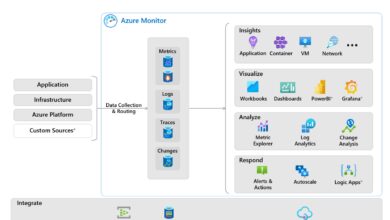
- Integrate with Azure Monitor to track metrics like ingress/egress, latency, and server-side errors.
- Set up alerts for abnormal spikes in 4xx/5xx errors or throttling events.
- Use Log Analytics to query diagnostic logs and identify access patterns.
For example, if you notice consistent throttling during business hours, it may be time to upgrade to a premium tier or distribute load across multiple accounts.
Cost Management and Billing Insights
While cloud storage is cost-effective, unmanaged Storage Accounts can lead to runaway bills. Understanding pricing models and implementing cost controls is critical.
Breaking Down the Pricing Model
Cloud providers charge for several factors:
- Storage Capacity: Per GB/month based on tier (hot, cool, archive).
- Transactions: Read, write, list, and delete operations are billed per 10,000.
- Data Transfer: Egress (data leaving the cloud) often incurs fees; ingress is usually free.
- Operations: Additional costs for features like change feed or versioning.
For instance, storing 1 TB in the hot tier might cost $20/month, but retrieving it frequently could add $50+ in transaction fees.
Using Azure Cost Management Tools
Azure provides powerful tools to track and optimize spending:
- Cost Analysis: Visualize spending by service, resource group, or tag.
- Budgets: Set monthly limits and receive alerts when thresholds are exceeded.
- Recommendations: Get AI-driven suggestions like “Move 800 GB to Cool Tier” to save costs.
Linking your Storage Account to a specific department tag allows finance teams to allocate costs accurately across teams.
Lifecycle Management Policies
Automate cost savings with lifecycle rules that transition or delete data based on age.
- Move blobs to cool tier after 30 days.
- Archive data after 90 days.
- Delete temporary files after 180 days.
These policies reduce manual effort and ensure data isn’t kept longer than necessary, minimizing both cost and compliance risk.
Security and Compliance in Storage Accounts
No discussion of Storage Accounts is complete without addressing security. With increasing cyber threats and regulatory demands, securing your data is not optional—it’s mandatory.
Role-Based Access Control (RBAC)
Azure’s RBAC system allows fine-grained control over who can access what.
- Assign roles like Storage Blob Data Reader, Contributor, or Owner at the subscription, resource group, or account level.
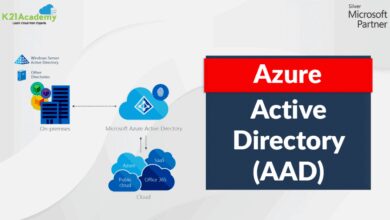
- Use Azure AD integration for identity-based access instead of shared keys.
- Implement least privilege principles—only grant the minimum permissions needed.
This reduces the risk of insider threats and limits damage from compromised credentials.
Shared Access Signatures (SAS) and Secure Tokens
SAS tokens provide time-limited, scoped access to resources without exposing account keys.
- Create SAS URLs for temporary file uploads or downloads.
- Set expiration times and restrict permissions (read, write, delete).
- Use service SAS for specific resources or account SAS for broader access.
For example, a mobile app can generate a SAS token to allow a user to upload a profile picture directly to blob storage—without going through a backend server.
Compliance and Audit Logging
Storage Accounts integrate with Azure Policy and Azure Security Center to enforce compliance standards.
- Enable audit logs to track every access event.
- Use Azure Policy to enforce encryption, private endpoints, or tagging requirements.
- Generate compliance reports for auditors using Azure Defender for Storage.
Organizations in regulated industries can demonstrate adherence to standards like ISO 27001, NIST, and PCI-DSS through these built-in capabilities.
Real-World Use Cases of Storage Accounts
Theoretical knowledge is valuable, but real-world applications show the true power of Storage Accounts.
Backup and Disaster Recovery
Many enterprises use Storage Accounts as the foundation for backup strategies.
- Back up virtual machines using Azure Backup to a dedicated Storage Account.
- Store database backups in the cool tier for long-term retention.
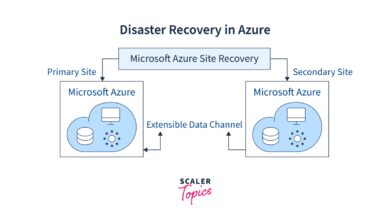
- Leverage GRS for geo-redundancy in case of regional disasters.
This ensures business continuity even in the face of hardware failures or natural disasters.
Big Data and Analytics Pipelines
Data lakes built on Azure Data Lake Storage Gen2 (which is based on Storage Accounts) power analytics for thousands of companies.
- Ingest streaming data from IoT devices into blob containers.
- Process data using Azure Databricks or Synapse Analytics.
- Archive raw data in the archive tier for compliance or future analysis.
For example, a retail chain might analyze customer behavior by processing terabytes of point-of-sale data stored in a GPv2 account.
Static Website Hosting
Storage Accounts can host static websites with high availability and low latency.
- Enable static website hosting in the Azure portal.
- Upload HTML, CSS, JavaScript, and media files to the $web container.
- Integrate with Azure CDN for global caching and DDoS protection.
This is a cost-effective alternative to traditional web hosting, especially for landing pages, documentation sites, or marketing campaigns.
Future Trends in Storage Accounts
As technology evolves, so do Storage Accounts. Emerging trends are shaping the next generation of cloud storage.
AI-Driven Data Management
Cloud providers are integrating machine learning to automate data tiering, anomaly detection, and cost optimization.
- Predictive analytics will recommend when to move data to archive.
- AI can detect unusual access patterns indicating potential breaches.
- Auto-scaling storage based on historical usage trends.
Edge Storage Integration
With the rise of edge computing, Storage Accounts are being extended to on-premises devices via Azure Stack Edge or AWS Snowball.
- Process data locally and sync to cloud Storage Accounts when connectivity allows.
- Reduce latency for industrial IoT and remote field operations.
- Ensure data sovereignty by controlling where data is stored and processed.
Quantum-Resistant Encryption
As quantum computing advances, current encryption methods may become vulnerable. Cloud providers are already researching post-quantum cryptography for future Storage Accounts.
- Development of quantum-safe key exchange protocols.
- Testing new encryption standards within isolated environments.
- Preparing for a future where AES-256 may no longer be sufficient.
The future of Storage Accounts isn’t just about more space—it’s about smarter, safer, and more adaptive storage.
What are Storage Accounts used for?
Storage Accounts are used to store various types of data in the cloud, including files, blobs, messages, tables, and virtual machine disks. They support use cases like backup and recovery, big data analytics, static website hosting, and hybrid cloud storage.
How do I secure my Storage Account?
You can secure your Storage Account by enabling encryption at rest and in transit, using Role-Based Access Control (RBAC), generating Shared Access Signatures (SAS) for temporary access, disabling public access, and integrating with Azure Key Vault for customer-managed keys.
What is the difference between GPv2 and Blob Storage Accounts?
General Purpose v2 (GPv2) accounts support all Azure Storage services (Blob, File, Queue, Table, Disk), while Blob Storage Accounts are optimized solely for unstructured blob data. GPv2 is more flexible and cost-effective for most scenarios.
Can I reduce costs with Storage Accounts?
Yes, you can reduce costs by using access tiers (hot, cool, archive), setting up lifecycle management policies, monitoring usage with Azure Cost Management, and choosing the right redundancy level based on your availability needs.
Are Storage Accounts highly available?
Yes, Storage Accounts offer high availability through redundancy options like LRS, ZRS, GRS, and GZRS. Geo-redundant options ensure data remains accessible even during regional outages.
Storage Accounts are far more than just digital drawers for your files—they are dynamic, intelligent systems that form the foundation of modern cloud architecture. From securing sensitive data to enabling global-scale applications, their role is indispensable. By understanding their types, features, and best practices, you can harness their full potential to drive efficiency, security, and innovation. As technology advances, Storage Accounts will continue to evolve, integrating AI, edge computing, and next-gen security to meet the demands of tomorrow’s digital landscape.
Further Reading: